Car Destruction Engine Guides
Soft-body crash tutorials, controls, and Early Access tips from first spawn to satisfying wrecks.
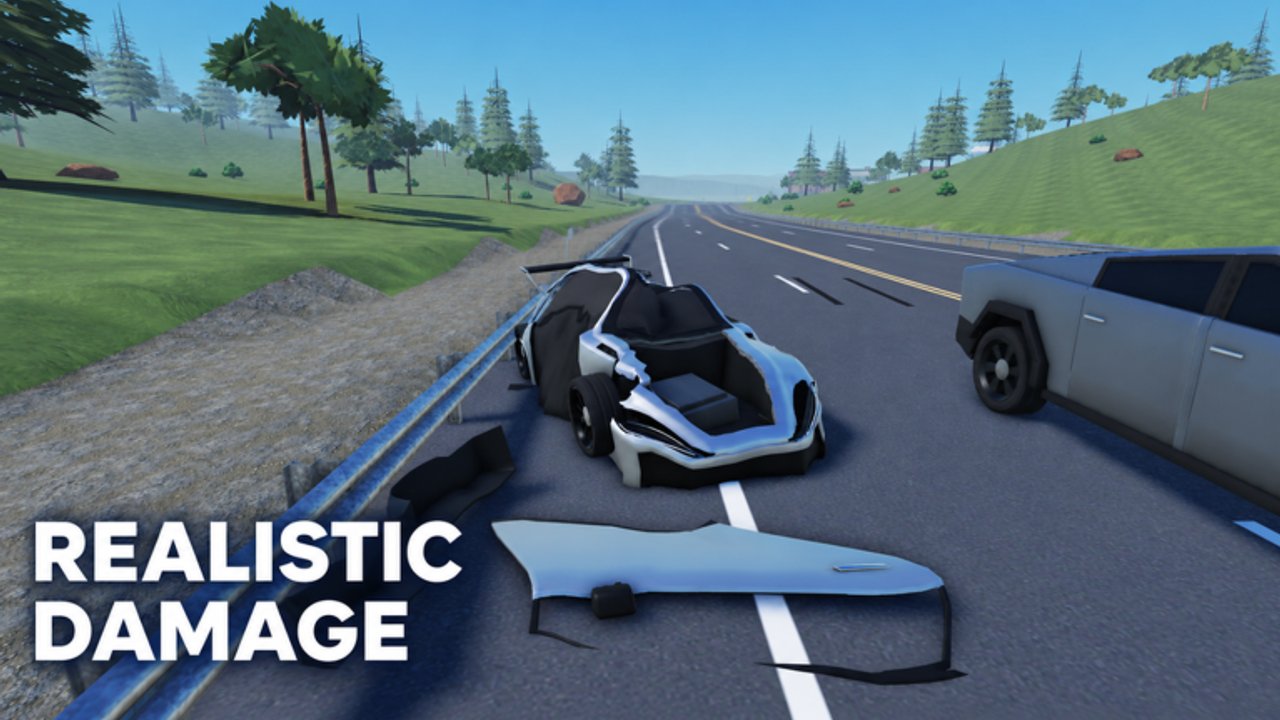
Welcome to the Guides Hub for Car Destruction Engine on Roblox. This Early Access vehicle sim from RED x ICE Studios focuses on soft-body car crash physics that run on most devices. Whether you just joined a 12-player server or you are hunting the cleanest crumple for a clip, this hub maps every walkthrough on the wiki so you never hunt through random chat advice again.
Start with Getting Started if you are brand new. Then learn Controls so driving, camera, and respawn feel natural. When you want better wrecks, read Crash Tips and dig into Soft-Body Physics to understand why some impacts fold beautifully while others bounce. Cross-check the Tier List and Best Cars when you are ready to compare cars, skim Updates after patches, and keep Codes bookmarked in case promo rewards appear later.
What this hub covers
Car Destruction Engine is a free-to-play Simulation / Vehicle Sim experience (0 Robux listed) that entered Early Access on 2026-10-06. Soft-body deformation is the headline feature: panels buckle, crumple zones collapse, and wrecks look closer to dedicated crash sims than classic Roblox bumper cars. Guides here stay practical—how to join, how to drive, how to set up impacts, and how to keep performance stable while the physics cook.
Use this hub when you need:
- A first-hour checklist that avoids wasted spawns
- Clear control notes for PC, with honesty about Early Access bind changes
- Crash setups that favor deformation over random spinning
- Physics vocabulary so community tips actually make sense
- Links into codes, scripts status, player pages, and update notes
Recommended reading order
- Getting Started — join the place, spawn a car, learn server flow, and set expectations for Early Access.
- Controls — WASD-style vehicle driving, camera habits, and respawn recovery when you flip or stall.
- Crash Tips — angle, speed, and target choice for satisfying soft-body moments.
- Soft-Body Physics — crumple zones, deformation behavior, and performance tips for busy servers.
- Performance & Devices — keep crumples readable on PC and mobile in 12-player lobbies.
- Map Landmarks — scout walls, ramps, and open flats after patches.
- Troubleshooting — reseat, rejoin, and fix common Early Access friction.
After the core guides, branch into the Tier List for vehicle rankings, Players and Friend Sessions for social play, November 2026 Notes after the mid-November update window, Scripts for script availability notes, and Links for official Roblox destinations.
How to use guides during Early Access
Early Access means maps, cars, UI labels, and exact keybinds can shift when Red and Ice (group owner IcePerq) ship patches. Treat every guide as current best practice for late 2026 research, then re-check Updates after a major push. If a control differs on your device, verify in-game prompts first—community-reported binds help, but the live client wins.
When you finish a guide, follow its internal links. Sibling pages reinforce each other: crash tips assume you already know how to drive; physics explainers make those tips clearer; getting started points you at both so your first session is not pure chaos.
Quality bar for this wiki
Every English guide aims for depth without filler: real steps, honest uncertainty where binds are community-reported, and no invented promo codes or scripts. As of November 2026 research there are no confirmed active promo codes, and no game-specific scripts turned up on major script sites yet—see Codes and Scripts for the living status pages.
Favorite the experience on Roblox, join the RED x ICE Studios community when you want patch chatter, and return here when you need structured advice instead of lobby noise. Soft-body crashes reward patience: learn the tools, then break the cars on purpose.
Next steps
Pick a guide above and open it now. If you only have ten minutes, do Getting Started then one practice crash using tips from Crash Tips. If you care about why metal folds the way it does, jump straight to Soft-Body Physics. Keep this hub as your map—every tutorial on the wiki should stay one click away from here.
Frequently Asked Questions
Quick answers to the most common questions.
Where should new Car Destruction Engine players start?
Open Getting Started for the first-hour checklist, then Controls so driving and respawn feel natural before you chase big soft-body crashes.
Do these guides work during Early Access?
Yes, with the caveat that maps, cars, and binds can change. Re-check Updates after patches and trust in-game prompts over outdated chat advice.
Is Car Destruction Engine free on Roblox?
Yes. It is listed as free to play (0 Robux) as a Simulation / Vehicle Sim experience with soft-body crash physics.
How many players are in a server?
Servers support up to 12 players. Busy lobbies mean more chaos—and more objects for the soft-body system to resolve.