Getting Started with Car Destruction Engine
Join the Early Access soft-body crash sim, spawn cleanly, and learn what to do in your first session.
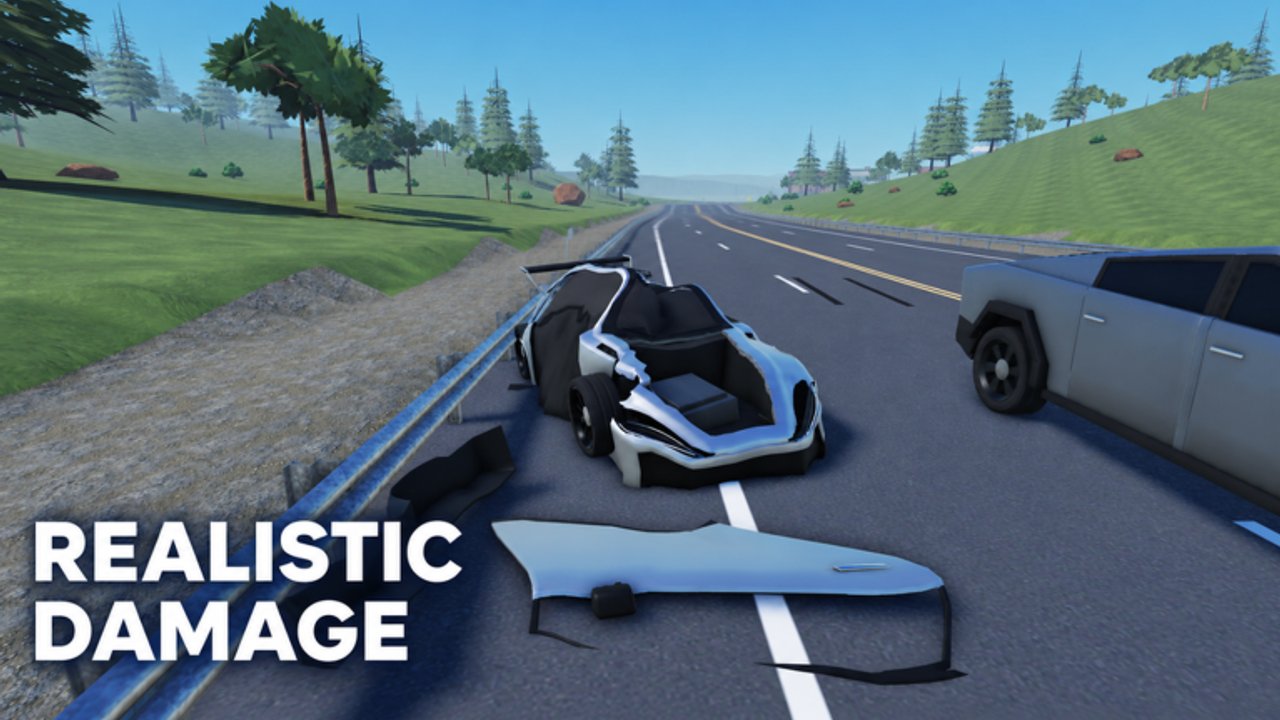
Car Destruction Engine is a free-to-play Roblox Simulation / Vehicle Sim from RED x ICE Studios (devs Red and Ice; group owner IcePerq). It entered Early Access on 2026-10-06 and focuses on soft-body car crash physics that run on most devices. This getting-started guide walks you from the Roblox join button to your first intentional wreck without wasting the opening minutes on confusion.
Servers hold up to 12 players. The experience has grown past 1.9M+ visits with thousands concurrent at peaks and roughly an 82% like ratio—busy enough that you should expect chaos, lag spikes, and other drivers using your hood as a bumper. Treat Early Access as a living sandbox: cars, maps, and UI text can change after patches. Bookmark Updates and return here when the onboarding flow shifts.
Join the game the right way
- Open the official place: Car Destruction Engine on Roblox (Place ID 136302164521498, Universe ID 10769652950).
- Favorite the experience so it stays in your list when servers rotate.
- Optionally join the RED x ICE Studios group for community news—group perks may expand during Early Access.
- Enter a public server. If the lobby feels packed or physics hitch hard, hop once; soft-body work is heavier than simple Roblox cars.
You do not need Robux to start. The listing is free to play. Cosmetics or paid cars may appear later—always check the live shop rather than outdated screenshots.
First five minutes checklist
Use this loop once you load in:
- Orient — Find spawn, vehicle selectors, and any on-screen control hints. Early Access UIs move; trust the client.
- Spawn a starter car — Pick something simple before chasing rare models. You need a clean drive cycle before you chase clips.
- Drive a short loop — Practice throttle, steer, and brake on open pavement. See Controls for WASD-style vehicle habits and camera tips.
- Take a gentle impact — Tap a barrier or roll into a parked object at low speed. Watch how panels deform instead of instantly vanishing.
- Respawn or reset — Learn recovery early. Flips and stalls are normal when soft-body crumple locks a wheel.
If the first crash looks rubbery or delayed, lower graphics slightly and retry. Soft-body simulation shares CPU/GPU budget with other players’ wrecks—performance tips live in Soft-Body Physics.
What makes this game different
Most Roblox vehicle games treat damage as health bars or part deletion. Car Destruction Engine sells deformation: metal folds, crumple zones collapse, and wrecks keep shape after the hit. That is why creators call out soft-body crashes in reviews and compilations. Your job as a new player is not to memorize every machine on the map on day one—it is to feel how speed and angle change the fold.
After your first gentle hit, try a medium-speed front impact into a solid prop. Compare that to a glancing side swipe. Then read Crash Tips for setups that look good on camera. When you want the vocabulary behind crumple and performance, open the physics guide.
Early goals that actually help
Skip random grinding advice until you understand the sandbox loop:
- Stable driving — Arrive at crash sites without spinning out every corner.
- Readable wrecks — Impacts where you can see which panel failed.
- Recovery muscle memory — Respawn, re-seat, and re-approach without rage quitting.
- Server awareness — Twelve players means someone may steal your ramp or ram you mid-setup. Plan shorter approaches.
Progression systems (cash, XP, unlocks) can change in Early Access. Prefer goals that still matter if economies reset: better crash literacy, cleaner camera work, and knowing which cars feel stiff versus floppy. When rankings matter, check the Tier List for community vehicle comparisons—not as gospel, but as a starting filter.
Codes, scripts, and expectations
As of November 2026 research there are no confirmed active promo codes. Do not trust random Discord lists that invent rewards. Keep Codes bookmarked and redeem only when this wiki or the developers confirm a code.
Likewise, no game-specific scripts were found on ScriptBlox, Rscripts, or NoKeyScript during that research pass. Scripts tracks status honestly. Using third-party injectors always risks account action—this wiki does not promote cheating; it only reports whether public scripts exist for curious readers.
Social and safety basics
Voice or text chat varies by server culture. Mute toxic lobbies early. Soft-body games attract clip hunters who may intentionally ruin your setup—reset and move rather than escalate. If a player follows you across the map, change servers. Report clear harassment through Roblox tools.
Record short clips if you want feedback. Community highlight videos show what “good” deformation looks like; compare your crumple to those references after you finish this guide’s practice loop.
After the tutorial hour
When the checklist above feels automatic:
- Study Controls for camera and respawn detail.
- Apply Crash Tips for intentional soft-body moments.
- Read Soft-Body Physics so performance settings and crumple talk make sense.
- Skim Players and Links for social and official destinations.
- Watch Updates whenever the title screen or Discord announces a patch.
Car Destruction Engine rewards curiosity more than grind. Learn the join flow, respect the physics budget, and treat every wreck as a lesson in angle and speed. Your second session should already look cleaner than your first—soft-body sims punish panic and reward deliberate approaches.
Quick reference
| Fact | Detail |
|---|---|
| Platform | Roblox only |
| Status | Early Access since 2026-10-06 |
| Price | Free to play (0 Robux listed) |
| Genre | Simulation / Vehicle Sim |
| Max players | 12 per server |
| Hook | Soft-body car crash physics |
Ready for the wheel? Open Controls next, then break something on purpose with Crash Tips.
Frequently Asked Questions
Quick answers to the most common questions.
Is Car Destruction Engine free to play?
Yes. The Roblox listing shows 0 Robux. You can join, spawn cars, and practice soft-body crashes without paying, though paid content may appear later in Early Access.
When did Car Destruction Engine enter Early Access?
Early Access began on 2026-10-06. Features, maps, and controls can still change, so re-check Updates after major patches.
How many players can join one server?
Servers support a maximum of 12 players. Expect more chaos and heavier physics load when the lobby is full.
Are there working promo codes right now?
As of November 2026 research there are no confirmed active promo codes. Check the Codes page before redeeming anything from random chats.
What should I do after my first crash?
Practice recovery with Controls, then read Crash Tips for better angles and Soft-Body Physics if impacts feel soft, delayed, or laggy.