Controls for Car Destruction Engine
Drive, look, and recover after soft-body wrecks—with honest notes when binds are still settling in Early Access.
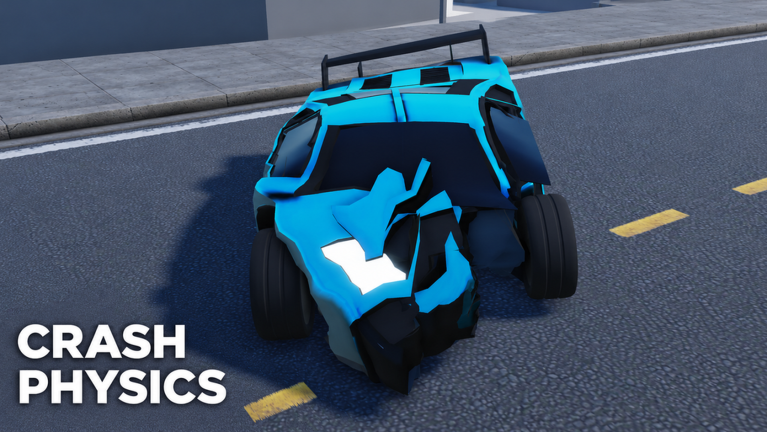
Clean crashes start with clean inputs. This Controls guide for Car Destruction Engine covers typical Roblox vehicle driving on PC, camera habits that help you aim soft-body impacts, and respawn recovery when a crumple leaves you upside down. The game is Early Access (since 2026-10-06) from RED x ICE Studios, so treat every bind as verify in-client first. Where the community reports defaults that match standard Roblox vehicle seats, we say so. Where something is unclear or device-specific, we stay honest instead of inventing a fake key table.
If you have not finished the onboarding loop, skim Getting Started first. When you are ready to turn control skill into better wrecks, jump to Crash Tips and Soft-Body Physics.
Core driving (PC defaults, community-typical)
Most Roblox vehicle seats use the classic movement set. Players consistently report the following as the baseline for Car Destruction Engine on keyboard:
| Action | Typical PC bind | Notes |
|---|---|---|
| Throttle / forward | W | Hold for speed; soft-body mass means cars do not stop instantly |
| Brake / reverse | S | Tap to scrub speed before impact; hold for reverse once stopped |
| Steer left / right | A / D | Smooth arcs beat twitch steering when lining up crumple shots |
| Jump / exit context | Space (context) | Behavior depends on seat vs on-foot; check on-screen prompts |
| Camera / look | Mouse | Keep the nose in frame before high-speed approaches |
These matches standard Roblox vehicle patterns. Early Access patches can remap UI buttons, add gamepad glyphs, or change mobile sticks without a full patch note. If your client shows different labels, follow the client—not this table.
Driving habits that matter for soft-body play
- Feather the throttle into corners. Soft-body cars carry momentum; panic steering mid-slide often flips you before the crash you wanted.
- Brake in a straight line when possible. Trail-braking into a barrier can rotate the chassis and smear the impact across the wrong panel.
- Commit to an approach angle. Wiggle corrections at the last second turn a clean front crumple into a glancing bounce—see Crash Tips.
- Leave a recovery plan. Know where you will reverse or respawn if the first hit stalls the engine or folds a wheel well.
Camera and view control
Soft-body deformation is a visual payoff. If the camera sits in the dirt or locked behind a crushed roof, you miss the crumple you earned.
Practical camera tips players use in similar Roblox vehicle sims—and that apply well here:
- Third-person default for setups — Wider FOV helps you judge distance to walls, ramps, and other cars in 12-player servers.
- Nudge the mouse before throttle — Align the shot, then accelerate. Looking while already sideways usually means you hit with the door instead of the bumper.
- Re-center after big impacts — Deformation can shove the chassis; a quick mouse reset keeps the next clip readable.
- Watch for first-person toggles — Some Roblox vehicle experiences bind view swaps to V, a UI arrow, or a mobile button. If Car Destruction Engine exposes a view toggle in your build, test it in a quiet lot before a public derby. Do not assume a bind that only exists in a different crash game.
Mobile and console players should treat on-screen sticks and face buttons as authoritative. Touch UI often hides secondary actions behind a ”…” or car icon—open those panels once per session after an update.
Respawn, reset, and unstuck flow
Soft-body physics love to leave you on the roof with a folded A-pillar. Recovery is part of the control kit:
- Stop fighting a dead pose — If wheels are airborne and throttle only digs you deeper, reset.
- Use in-game reset / respawn options when shown — Labels vary in Early Access (Reset, Respawn, Menu → character reset). Prefer the game’s vehicle reset if one exists so you keep the same car.
- Roblox character reset as a last resort — Escaping the seat and resetting your avatar can free a soft-lock, but you may lose position.
- Re-spawn the vehicle from the selector if the chassis is too deformed to drive. Crumple is the point of the game; sometimes the correct control input is “new car.”
- Server hop only when physics hitch or griefers camp your spawn—not after every flip.
Practice the full loop: drive → controlled hit → assess → reset → repeat. That muscle memory matters more than memorizing a rare key nobody can confirm.
Gamepad and mobile notes
Roblox maps gamepad sticks to move/steer and face buttons to context actions. Exact glyphs depend on your controller type and the experience’s bindings. Expect:
- Left stick for steer / move
- Triggers or face buttons for throttle / brake on many vehicle seats
- A menu button for respawn or vehicle select
Mobile usually shows a virtual joystick plus contextual buttons near the thumb. After each update, spend thirty seconds confirming which button exits the seat versus which one interacts with map machines. Community screenshots go stale fast in Early Access.
Controls that are not confirmed
To avoid spreading myths:
- We do not invent nitro, handbrake, horn, or light binds unless the live client shows them.
- We do not copy key lists from other Roblox crash games (different places, different scripts).
- We do not promise that a bind listed on an old YouTube overlay still works.
If a creator overlay disagrees with your HUD, trust the HUD. When developers document official binds, this page should be updated to match. Until then, “community-typical WASD vehicle seat + verify prompts” is the accurate stance.
Linking controls to better crashes
Controls are the delivery system for physics. Once throttle and camera feel boringly reliable:
- Use Crash Tips to choose speed and angle.
- Read Soft-Body Physics if deformation looks delayed—input lag and sim budget often travel together.
- Check the Tier List when some cars feel heavier or more stable under the same binds.
- Skim Updates after patches that mention driving, camera, or mobile UI.
Also keep Codes and Scripts in mind only as status pages—neither replaces learning to drive. As of November 2026 research there are no confirmed active codes and no widely listed game-specific scripts for this title.
Practice drill (ten minutes)
- Spawn in an open area away from the densest 12-player pileups.
- Drive a figure-eight using only smooth WASD inputs—no panic corrections.
- Stop, reverse in a straight line, then re-accelerate into a soft barrier at low speed.
- After the crumple, practice your reset flow until it takes under fifteen seconds.
- Repeat at medium speed while keeping the camera centered on the impact point.
Finish the drill, then open Crash Tips and intentionally aim for a front crumple zone hit. Controls mastery is quiet; the wrecks get loud afterward.
Troubleshooting sticky inputs
| Symptom | Likely cause | Try this |
|---|---|---|
| Car will not steer | Seat desync / soft-lock | Exit seat, reset vehicle, or respawn |
| Throttle but no move | Wheels folded / airborne | Reset; check deformation in Soft-Body Physics guide |
| Camera underground | Impact shove + mouse lag | Re-center mouse; toggle view if available |
| Rubber-banding | Busy server physics | Lower quality; hop servers; see physics performance tips |
| Mobile button missing | UI update | Rejoin; check expanded vehicle panel |
Stay patient. Soft-body titles punish mashy inputs more than arcade racers. Smooth hands, honest bind checks, and fast recovery will carry you farther than any unverified hotkey rumor.
Frequently Asked Questions
Quick answers to the most common questions.
What are the default driving keys in Car Destruction Engine?
Community reports match typical Roblox vehicle seats: W throttle, S brake/reverse, A/D steer, mouse for look. Always confirm against your live HUD because Early Access can change binds.
How do I reset after flipping my car?
Use any in-game vehicle reset or respawn option first. If you are soft-locked, exit the seat and use Roblox character reset, then spawn a fresh car if the chassis is too crumpled to drive.
Do mobile and console use the same controls?
They map to the same actions with different glyphs—virtual sticks on mobile, sticks and face buttons on gamepad. Check on-screen labels after every update.
Why does my car feel hard to control after a crash?
Soft-body deformation can fold wheel wells and shift weight. That is expected physics, not a broken bind—reset the vehicle and review Soft-Body Physics plus Crash Tips.
Will this control list stay accurate forever?
No. Early Access patches can remap UI and vehicle seats. Re-check Updates and in-game prompts after major changes instead of trusting old overlays.